
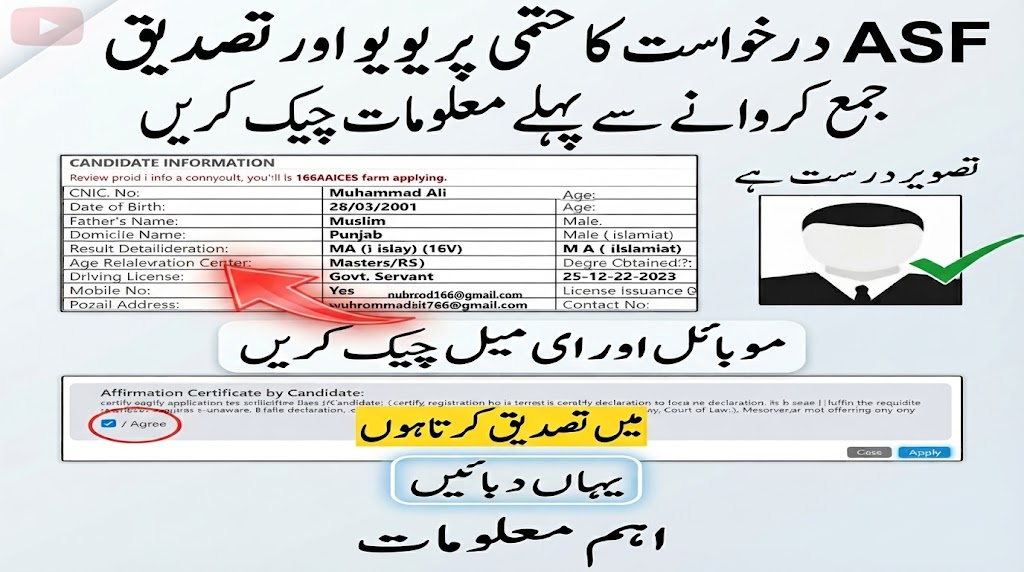
Applying for an Airports Security Force (ASF) position requires more than simply completing an online form. Candidates need to enter their personal and educational information accurately, upload the required documents in the correct format, select an appropriate test centre, and carefully review the application before final submission.
The official ASF registration guidelines also emphasize that incorrect information or unsuitable photographs can lead to rejection or prevent a candidate from appearing in the test.
This guide explains the ASF online registration process from the beginning of account creation to downloading the provisional registration slip.
Important: Always read the recruitment advertisement for the particular vacancy before applying. Eligibility requirements such as age, qualification, domicile, experience, gender, and professional certification can vary according to the advertised post.
ASF Online Registration Portal
Candidates applying for ASF recruitment should use the official online recruitment system:
The registration process is completed online. According to the official guidelines, manual applications or hard copies are not accepted as an alternative to the online application process.
1. Check ASF Eligibility Before Creating an Account
Before starting registration, first identify the post you want to apply for and read its advertisement carefully.
Check whether you meet the requirements relating to:
- Educational qualification
- Age
- Gender
- Domicile
- Professional qualification or certificate
- Required experience
- Other conditions mentioned for the particular vacancy
Do not select a post simply because it appears on the recruitment portal. Your eligibility should be confirmed from the relevant advertisement first.
Keep Your Documents Ready
Having your documents nearby can make the registration process easier and reduce the chance of entering incorrect information.
Depending on the vacancy, candidates may need information from:
- CNIC
- Domicile certificate
- Matric certificate
- Highest completed educational qualification
- Professional diploma or certificate
- Experience documents
- Driving licence for applicable driver posts
The ASF guidelines specifically advise candidates to keep their original documents available while completing the form so that information can be entered accurately.
2. Create Your ASF Candidate Account
Open the ASF recruitment website and select the online application/sign-up option.
The candidate registration form is used to create your account before completing the detailed application.
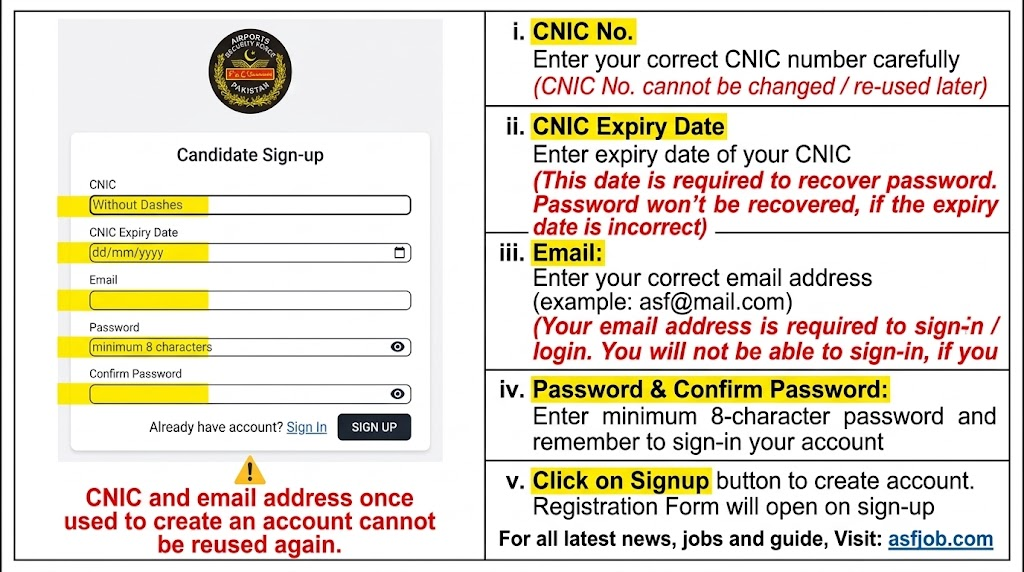
CNIC Number
Enter your CNIC number carefully.
The official instructions state that the CNIC used to create an account cannot be reused to create another account.
Therefore, check the number before submitting it.
CNIC Expiry Date
Enter the expiry date exactly as shown on your CNIC.
This is particularly important because the expiry date is used during password recovery. If the date entered during registration is incorrect, the password-recovery process may not work correctly.
Email Address
Use an email address that you can access.
The email is associated with your account login, and the official instructions warn that an incorrectly entered email can prevent you from signing in. An email address already used for an account cannot be reused for another account.
Password
Create a password according to the portal’s requirements.
The ASF registration guidelines specify a minimum password length of 8 characters. Keep your password secure because you will need it to access your candidate account.
After entering the required information, select Sign Up. The registration form will then become available.
3. What If You Forget Your ASF Email or Password?
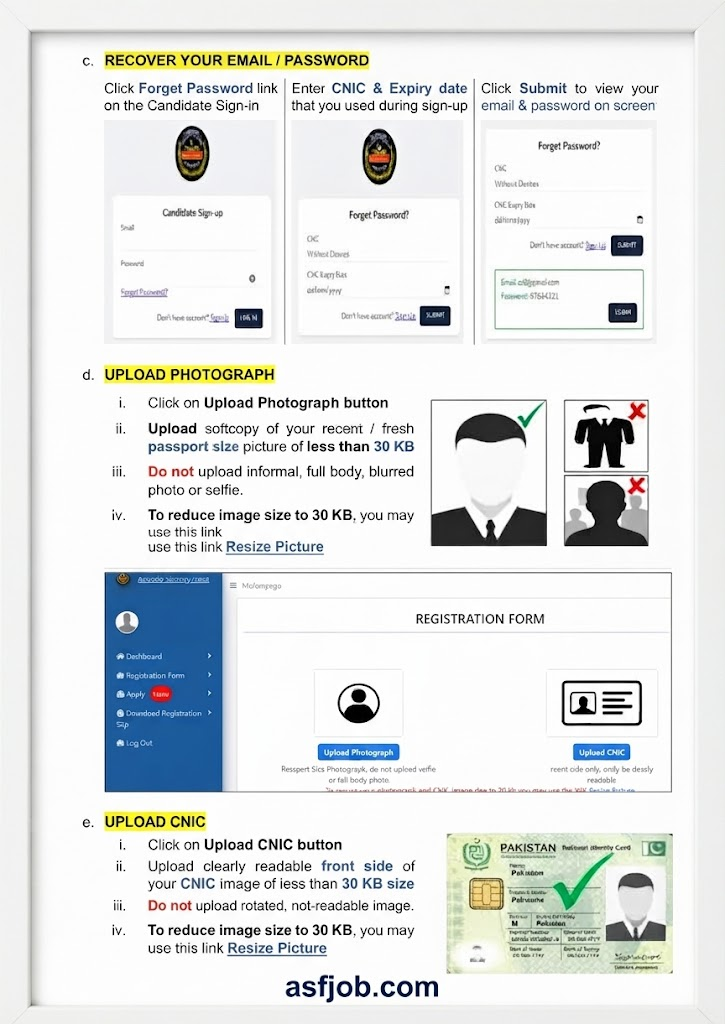
If you forget your login details, use the Forgot Password option available on the candidate sign-in page.
The official instructions indicate that candidates need to provide:
- CNIC number
- CNIC expiry date
These details should be the same ones used during account creation. After submitting the required information, the system can display the registered email and password information.
Useful Tip
Save your login information somewhere secure immediately after registration. This can save you from unnecessary problems when you return to your application later.
4. Upload Your Passport-Size Photograph
After creating your account, you will need to upload your photograph.
The official ASF instructions require a recent passport-size photograph with a file size of less than 30 KB.
Your photograph should be:
- Recent
- Passport-size
- Clear
- Suitable for official identification
- Within the required file-size limit
Avoid uploading:
- Selfies
- Full-body photographs
- Blurred pictures
- Informal photographs
The official guidelines specifically instruct candidates not to upload informal, full-body, blurred photographs or selfies.
If your image is larger than the permitted size, photo resize it before uploading.
5. Upload the Front Side of Your CNIC
The next important document is your CNIC.
Upload a clear image of the front side of your CNIC.
The ASF guidelines specify that the image should be less than 30 KB and clearly readable.
Before uploading, check that:
- The complete front side is visible.
- The information can be read clearly.
- The image is not rotated incorrectly.
- The file is within the required size.
- No important portion of the CNIC has been cut off.
A successful upload does not necessarily mean the document is suitable. Always preview the image before moving to the next section.
6. Choose Your ASF Test Centre
The application system provides a list of available test centres.
Select the centre where you want to appear for the test.
This selection deserves attention because the official ASF instructions state that the test centre cannot be changed later.
Before selecting the centre
Think carefully about where you will realistically be able to appear for the test and then make your selection.
Do not choose a centre randomly just to move through the form quickly.
7. Enter Your Domicile Information
The domicile section requires information from your own domicile certificate.
You will be asked to select:
- Province
- District
- Domicile issuance date
The official instructions specify that only self-domicile is accepted. The issuance date should also be entered after checking the original domicile document.
Important
Do not guess the domicile issuance date. Check the original certificate before entering it.
8. Complete Your Personal Information
The personal-information section contains several fields, and the ASF guidelines state that candidates should enter the information according to their records.
Information can include:
- Name
- Father’s name
- Date of birth
- Caste
- Gender
- Mobile number
- Contact number
- Religion
- Postal address
- Permanent address
- Age-relaxation information
- Disability information
- Driving licence information where applicable
Name
Enter your name according to the required educational record.
The ASF instructions specifically state that the name on the Matric certificate and CNIC should match.
Father’s Name
Enter your father’s name according to your official record.
Date of Birth
Enter your date of birth according to the Matric certificate.
The ASF instructions also state that the date of birth on the Matric certificate and CNIC should match, and the system calculates age automatically.
Gender
Select the applicable option shown on the application form.
The official registration guidelines list Male and Female as the available options.
Mobile Number
Use an active mobile number.
The ASF instructions specifically advise candidates to provide a correct active number for calls or SMS communication.
Contact Number
The contact number field should be different from the mobile number according to the provided ASF registration instructions.
Religion
Select the appropriate religion option.
Candidates belonging to a non-Muslim minority group may also need to provide the relevant religion information. The guidelines state that a certificate may be required during the interview for the minority quota.
Postal and Permanent Address
Enter complete addresses.
The postal address is particularly important because the guidelines mention its use for dispatching an offer letter.
9. Age Relaxation and Supporting Documents
If you are claiming an applicable age relaxation, make sure you can provide the required supporting evidence.
The ASF guidelines mention documents such as:
- NOC
- Disability certificate
- Office order of death
- Domicile
- Minority certificate
The relevant document may depend on the basis of the claimed relaxation.
Do not claim an age relaxation unless you meet the relevant conditions and can support the claim with the required documentation.
10. Driving Licence Requirements for Driver Posts
Candidates applying for driver-related positions need to pay particular attention to their licence information.
The official guidelines identify Corporal Driver and MT Driver among posts for which a driving licence is required. They also state that the licence should be valid and its issuance date should be entered.
If you are applying for a driving post, check the latest advertisement as well as the application requirements before proceeding.
11. Save and Verify Your Personal Information
After completing the personal-information section, do not immediately move on.
First check every entry.
The official registration instructions tell candidates to verify their information and then use the Update button to save it.
This is a good point to compare your entries against your original documents.
12. Enter Your Highest Completed Qualification
The education section plays an important role in determining which ASF posts appear as available to you.
The official instructions state that candidates should enter their highest completed degree/qualification.
For example, if you have completed Intermediate but enter Matric as your qualification, the system may not show posts that require Intermediate.
Simple rule
Enter the qualification you have actually completed—not a lower qualification and not a qualification you have not completed.
13. Add Professional or Technical Qualifications
Some ASF vacancies require a specific diploma or professional certificate in addition to general education.
The employment/qualification information required can therefore differ between posts.
The ASF guidelines give examples including:
- Laboratory Technology qualification for Lab Attendant
- Nursing or Pharmacy Dispensing qualification for Medical Attendant
- Nursing qualification for Compounder
The relevant diploma or certificate should be entered where the advertised position requires it, and the document may need to be produced at the interview stage.
Before entering a professional qualification
Check the vacancy advertisement and make sure the qualification you enter is actually relevant to the post.
14. Enter Your Employment or Experience Record
Employment information is not necessarily required for every post.
According to the ASF guidelines, it becomes important when:
- A particular vacancy requires previous experience.
- A candidate is claiming applicable age relaxation based on service as Armed Forces personnel or a government employee.
For an experience-based vacancy, enter the relevant employment details accurately.
If experience is required, keep your experience certificate available because it may be requested during the interview.
Candidates claiming an applicable age relaxation based on government or armed-forces service may also need to provide an NOC.
15. Apply for Available ASF Posts
Once your registration information has been completed, the Apply Now option becomes available.
You can access it from the bottom of the form or through the left-side menu.
One useful feature of the system is that it displays the posts for which the candidate is eligible based on the information entered.
Review the available posts and select the relevant option or options using the provided checkboxes.
Then select Apply to proceed.
Do not skip the eligibility check
Even when a post appears in your account, read the vacancy advertisement carefully before finalizing your application.
16. Review the Application Before Final Submission
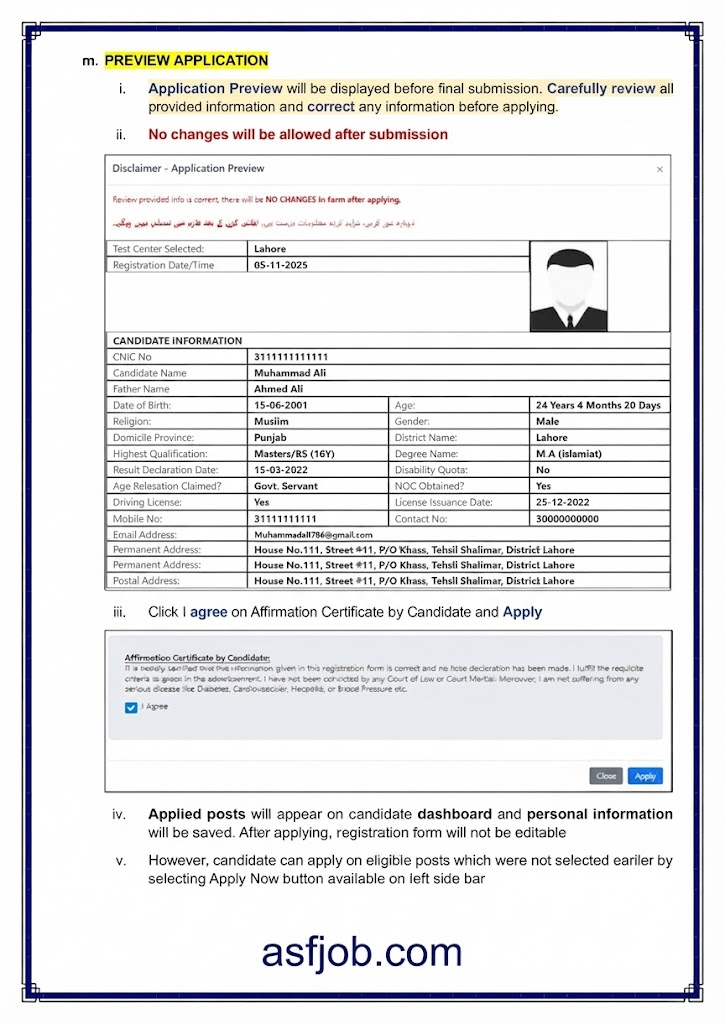
Before your application is finally submitted, the system provides an application preview.
This is your final opportunity to identify mistakes in the information you entered.
Take your time and check:
- CNIC
- CNIC expiry date
- Name
- Father’s name
- Date of birth
- Contact details
- Domicile
- Test centre
- Educational qualification
- Professional qualification
- Experience
- Selected posts
- Uploaded photograph
- Uploaded CNIC
Why is the preview important?
The official ASF instructions state that changes are not allowed after submission, and the registration form becomes non-editable after applying.
Therefore, do not treat the preview as a formality.
17. Submit the Application
After checking the preview, complete the candidate affirmation and submit the application.
The official instructions specify that candidates must select the agreement/affirmation option before applying.
Once submitted:
- Your selected posts will appear on your candidate dashboard.
- Your personal information will be saved.
- The registration form will no longer be editable.
However, the guidelines indicate that candidates may still be able to apply for other eligible posts that they did not select previously by using the Apply Now option.
18. Download Your ASF Registration Slip
After successful submission, a Provisional Registration Receipt is generated as confirmation that the online application has been submitted.
To obtain the slip:
- Open the candidate dashboard or side menu.
- Select Download Registration Slip.
- Open the generated slip.
- Select the print option.
- Save the document as a PDF.
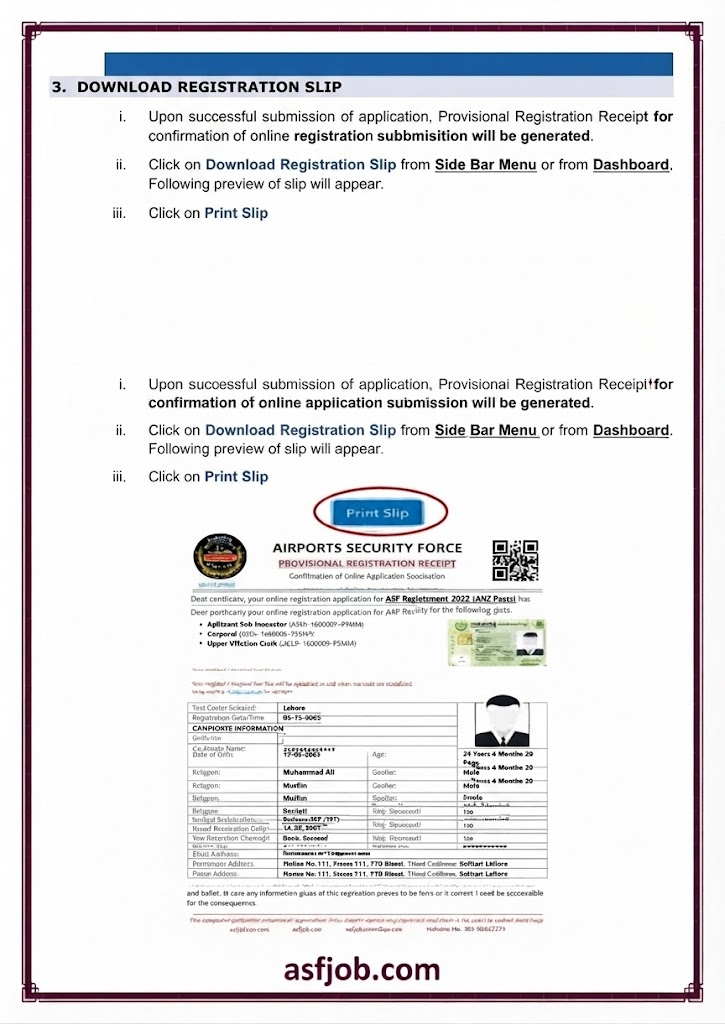
The ASF guidelines specifically instruct candidates to save the registration slip as a PDF after using the print option.
Keep the PDF Safe
Save a copy on your phone or computer and, if possible, keep another backup.
Do not rely on remembering your application details later.
ASF Online Application Mistakes You Should Avoid
The official registration document gives a specific warning about relying entirely on computer shops or internet centres to complete the application.
The concern is that operators may enter information quickly without verifying the candidate’s CNIC, personal information, or educational details. According to the guidelines, such mistakes can result in rejection of the application or disqualification from the test.
Common mistakes to watch for
1. Incorrect CNIC
One wrong digit can make your account information incorrect.
2. Wrong CNIC expiry date
This is particularly important because the expiry date is used for password recovery.
3. Incorrect email address
A wrong email can create login problems.
4. Incorrect date of birth
Compare the information with your required official records.
5. Wrong domicile information
Use your own domicile and verify the district and issuance date.
6. Incorrect educational qualification
Enter your highest completed qualification as required by the system.
7. Poor-quality photograph
Do not upload a selfie, informal image, full-body photograph, or blurred picture.
8. Unreadable CNIC image
Make sure the front side is clearly visible and readable.
9. Wrong test centre
Check the selected centre carefully because the official instructions state that it cannot be changed later.
10. Unsupported experience
Only enter genuine experience that matches the vacancy requirements.
11. Skipping the application preview
Always review the complete form before final submission.
Should You Use a Computer Shop to Apply?
The ASF guidelines recommend that candidates do not rely solely on computer shops or internet centres for completing their forms.
If you need assistance with the technical side of the application, someone may help you, but you should personally check every entry before submission.
This is especially important for:
- CNIC
- Date of birth
- Qualification
- Domicile
- Contact details
- Selected posts
- Uploaded documents
Ultimately, the information submitted through your account is your responsibility.
ASF Online Registration Final Checklist
Before submitting your application, go through this checklist:
- I have read the relevant ASF advertisement.
- I meet the advertised eligibility requirements.
- My CNIC number is correct.
- My CNIC expiry date is correct.
- My email address is correct and accessible.
- My password is saved securely.
- My photograph is recent and meets the file-size requirement.
- My CNIC front-side image is clear and within the required size.
- I selected the correct test centre.
- My domicile province and district are correct.
- My domicile issuance date is correct.
- My name matches the required records.
- My date of birth is correct.
- My mobile number is active.
- My qualification is entered correctly.
- I entered professional qualifications where required.
- I entered relevant experience where required.
- My driving licence information is correct if applying for a driver post.
- I reviewed the application preview.
- I submitted the application only after checking all information.
- I downloaded and saved my registration slip.
Need Help With ASF Online Registration?
The registration guideline provides the following contact information for assistance with online registration:
Phone: 021-99242578
Email: info@joinasf.gov.pk
In person: Nearest ASF Recruitment Center
For any recruitment cycle, candidates should also check the latest official advertisement and portal instructions because requirements can be specific to the advertised posts.
Frequently Asked Questions
Can I change my ASF test centre after selecting it?
The official guideline states that the selected test centre cannot be changed later.
What photograph size is required for ASF online registration?
The provided guideline specifies a recent passport-size photograph of less than 30 KB.
What size should the CNIC image be?
The guideline specifies a clearly readable front-side CNIC image of less than 30 KB.
Final Word
A successful ASF online application depends on accurate information, correct documents, careful eligibility checking, and a final review before submission.
Do not rush through the registration form. Keep your original documents beside you, enter information exactly as required, verify every important field, and save your registration slip after submitting the application.
Most importantly, use the latest ASF recruitment advertisement and official portal instructions for the recruitment cycle in which you are applying. The guide above is based on the official ASF online-registration guideline provided for this article and is intended to help candidates understand the registration procedure.